How to Resolve Buffering and Freezing
If most channels work fine, but there is a channel frozen or buffered, or no sound. The problem would be in the device’s decoding ability. Please go to our IPTV APK MISC to try: hardware/software decoding and it will solve this problem. MISC-Decoding Model-Hardware/Software Decoding.
The following is a step-by-step guide for switching IPTV decoders:
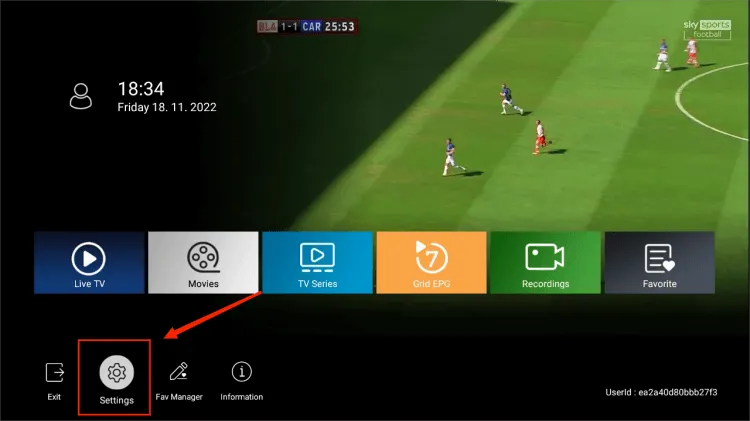
- Launch the IPTV App on your device.
- Navigate to the Settings option on the main interface.

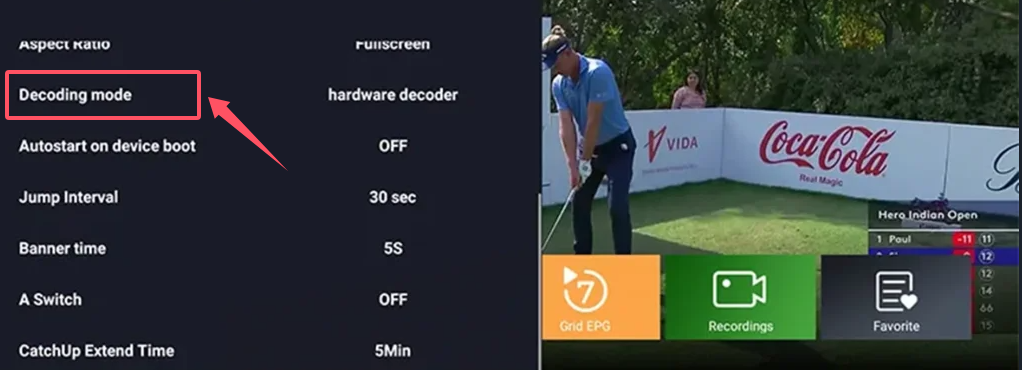
- Scroll down to the Decoder mode option.
- Press the right arrow on your remote control to cycle through the available decoders: software decoder, hardware decoder, VLC HW decoder, sync decoder, and ExoPlayer decoder.
- Choose the Appropriate Decoder:
- Sync Decoder: If you experience audio and video synchronization issues, switch to the Sync decoder.
- Software or Hardware Decoder: If you encounter buffering or freezing issues, try switching to either the software or hardware decoder.
- Wait for two seconds, then click OK when prompted.
- Check if the audio and video synchronization issue is resolved.
If not solved, please contact us for support.