How to clear cache on IPTV App?
Why Clear Cache on IPTV App?
The cache saves the duplicated materials and items of IPTV content on your app or device to save your internet bandwidth/traffic and speed up the process by loading them locally, enabling you to access your favorite content faster.
However, like all IPTV players, the App may sometimes display issues such as the inability to display EPG or channel icons, and in some cases, the application may not even load saved playlists. This is often caused by cache failures. Therefore, it is important to regularly clean the cache on your IPTV app. Read on to learn how to clear the cache on the App.
How to Clear the Cache on IPTV App?
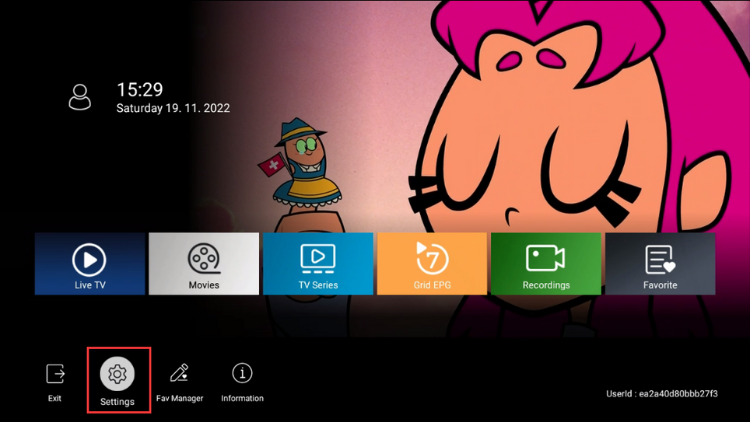
- On the application dashboard, click the gear icon to open the settings.

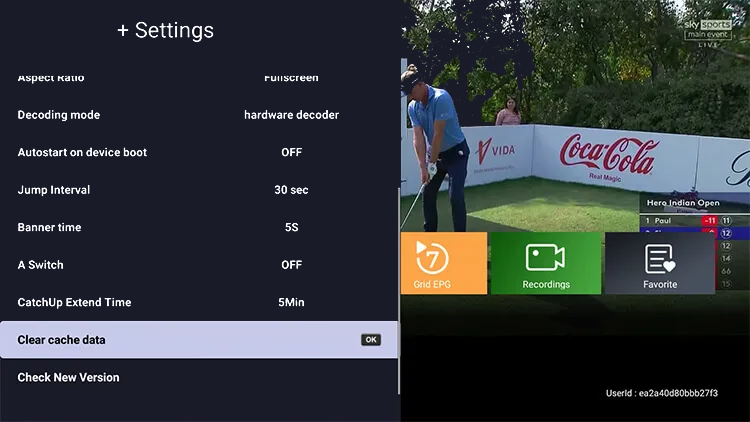
- Scroll down, and you will see the option to Clear cache data. Click it.
- After the cache has been cleared successfully, you will need to restart IPTV App, and the channel list, channel icons, EPG information, and other features will reload. Please wait a moment.
- Now you can check the previously failed application’s functionality and see if they are working correctly.