How to Activate a Sub-Device Subscription?
Download link:
Sub Device App for Android TV / TV Box / Firestick: https://www.topiptvguide.com/substb.apk
Sub Device App for Android Phone: https://www.topiptvguide.com/subpad.apk
How to Install and Activate
You can purchase a Sub-Device subscription to use Our IPTV on a second device at a discounted rate. Here’s how to activate it:
- Download and Install the Sub-Device App:
- Install the Sub-Device App on your second device.
- Activate the Sub-Device App:
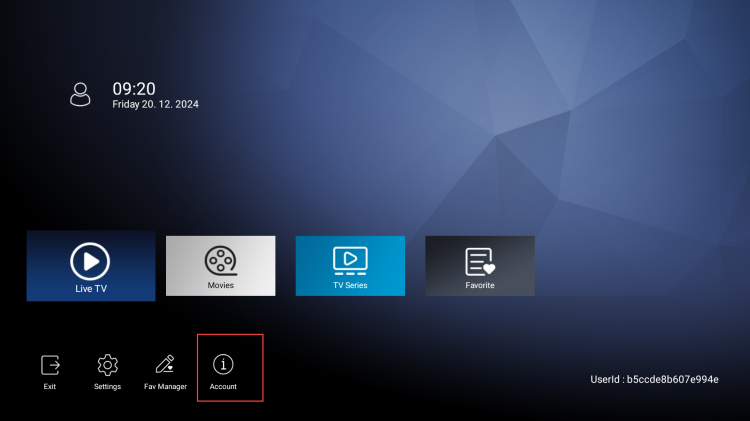
- Open the Sub-Device App and click the Account button.

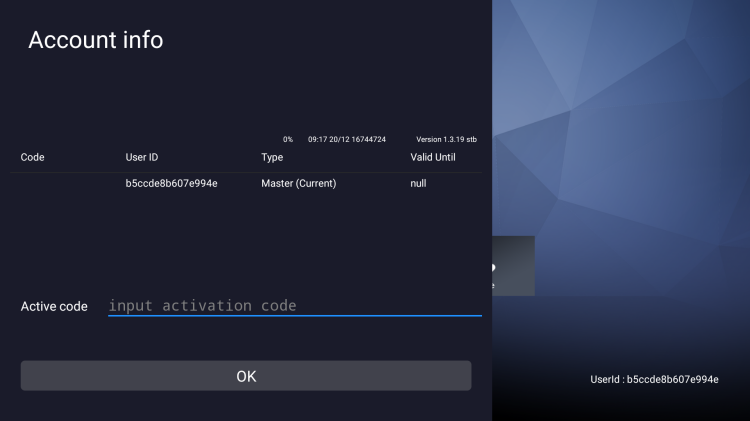
- First, enter your main subscription code (Standard IPTV or Plus IPTV) in the “Active code” section and click OK.
- Then, enter your Sub-Device subscription code.
- Open the Sub-Device App and click the Account button.
- Enjoy on Your Second Device:
- Now, you can enjoy Our IPTV channels and content on your second device.