How to Install IPTV on Android Phone
Here is a step-by-step tutorial on How to Install IPTV on Android Phone:
- Device Setup:
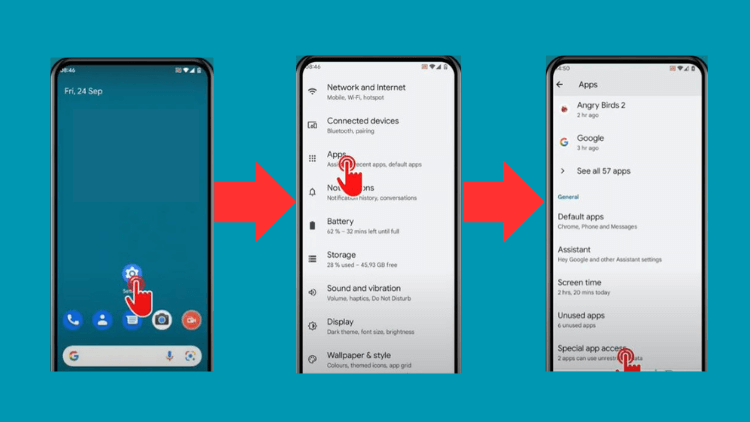
- First, go to your device settings.
- Navigate to “Settings,” then “Apps,” and look for “Special app access.”

- Allow App Installation:
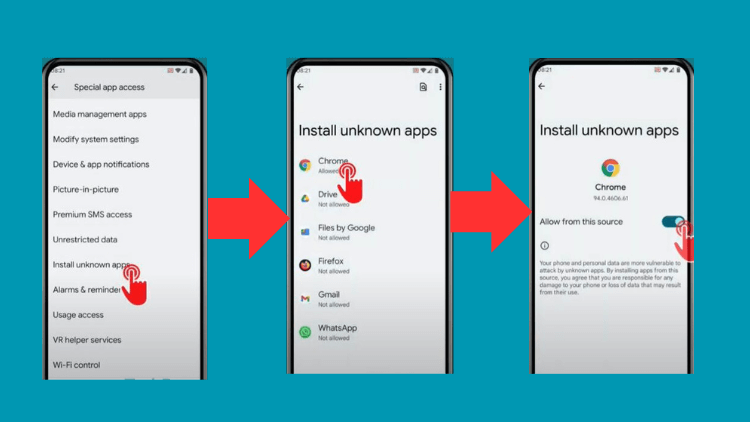
- Now, tap “Install unknown apps” and choose your web browser, like Chrome.
- Toggle on “Allow from this source” – it’s like permitting your web browser.
- Download and Install:
- Launch the Chrome browser and enter the IPTV App’s download link.
- Once the download is done, find the IPTV App file.
- Tap on “Install” to start the installation process. You may need to grant permission to your phone to install apps from unknown sources.
- Wait for the installation to finish.
Now, that you’ve completed the installation.